
Sven On Tech | June 30, 2010
Review: NewerTech MaxPower eSATA 6G PCIe 2.0 Controller Card
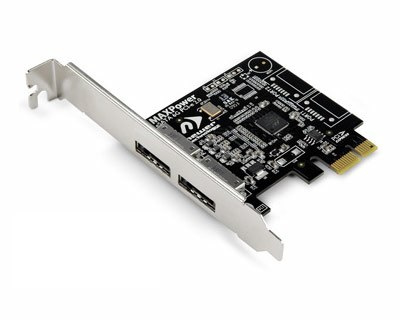
- Easy to install
- Driverless installation
- Bootable on Windows machines
- Excellent warranty
- Only has two ports
The Bottom Line
With speed gains of SATA / SATA II and a slew of accessories on the market to take advantage of the SATA protocol,
slipping one of these MAXpower controller cards into your PCI-Express slot is a no brainer.
Ratings
Overall


Yes
Full Review
Mac users have been enjoying the benefits of SATA for nearly a decade and the protocol has finally become a standard in
all computers manufactured today. From optical to platter based drives to solid state drives, SATA is the standard. Now
that standard is starting to wash and soak into accessories making the eSATA port almost as common as the FireWire port.
Interestingly enough, Apple does not put eSATA ports on its machines and many PCs are missing these ports as well,
though I have seen quite a few PC laptops with them. If you would like to take advantage of the SATA speeds of the many
accessories out there and you have a PCI-Express port, then may we interest you in a NewerTech MAXPower eSATA 6G PCIe
2.0 Controller Card?
The NewerTech controller card gives you two eSATA ports giving your Mac Pro, "The fastest data interface available," according to NewerTech. The card gives you access to any eSATA external hard or optical drive, per NewerTech. Do note, however, NewerTech has advised SvenOnTech that the card does not support port multiplier cases or enclosures.
Installing the card is a piece of cake. Simply insert the NewerTech MAXPower eSATA card into an open PCI-Express slot with a good push until the card secures itself into place. Close up your Mac or PC and boot. That's it. Installed. There are no drivers needed or a need for future driver updates or maintenance. Once installed, the card gives you full backward compatibility with SATA Revision 1.x (1.5Gb/s) and 2.x (3 Gb/s). Hooking up your device requires no special cables as you can use the standard connecting cables that come with all SATA devices.
The MAXPower, under optimal conditions, can give you up to 500MB/s total card bandwidth. That's a lot of data that will allow you to move gobs of info quickly. To test the rate of transfer and access rates, I hooked up our Voyager Q "Quad Interface" FireWire 800/400/USB 2.0/eSATA – SATA I/II Hard Drive Docking Solution (read review) and shoved in an old SATA drive that originally came with my Mac Pro. Access was peppy to the point that it didn't feel like an external drive at all. I then located a large amount of dense files and copied them over to my internal drive. It was as if I had that old drive inside Bay 3 on my Mac Pro. "Vrrrroooom", went the data onto FX4, my primary hard drive. I then went the other way and copied over some large QuickTime movies, about 800 MB in size, and the same results; as if the drive was internal. I repeated this test with other drives and never had an issue of bottlenecks, files moved easily as if the ones and zeros were floating in the air from one drive to the other. Accessing old archived drives will now be easy and not a daunting task ever again thanks to the Voyager and the MAXPower eSATA card.
While I did not bench test my findings with the Voyager and docked hard drives, I did perform a test with the OWC Mercury Elite AL Pro mini (read review) and the speed was that about of FireWire 800, which could be attributed to the external hard drive more than the controller card.
I really like the NewerTech MAXPower eSATA 6G PCIe 2.0 Controller Card and the versatility it adds to my Mac Pro. Now I can be choosy when I purchase an external device and so can you.
To see the article as it appeared in the original published form, click the link provided.
All stories have been captured without modification to their content.